Snowflake integration guide
Snowflake is a cloud data warehousing solution, where you as a partner can store your data and integrate with the UID2 framework. Using Snowflake, UID2 enables you to securely share consumer identifier data without exposing sensitive directly identifying information (DII). Even though you have the option to query the Operator Web Services directly for the consumer identifier data, the Snowflake UID2 integration offers a more seamless experience.
This document is for those using the latest Snowflake marketplace listing. If you're using an earlier version, see Snowflake integration guide (pre-July 2025). If you're using the earlier implementation, we recommend that you migrate to the newer version to take advantage of the updates and enhancements: for details, see Changes from previous version. For migration information, see Migration guide.
Snowflake marketplace listing
The following listing for UID2 is available on the Snowflake marketplace:
For a summary of all integration options and steps for advertisers and data providers, see Advertiser/data provider integration overview.
Functionality
The following table summarizes the functionality available with the UID2 Snowflake integration.
| Encrypt raw UID2 to UID2 token for sharing | Decrypt UID2 token to raw UID2 | Generate UID2 token from DII | Refresh UID2 token | Map DII to raw UID2s |
|---|---|---|---|---|
| ✅ | ✅ | —* | — | ✅ |
*You cannot use Snowflake to generate a UID2 token directly from DII. However, you can convert DII to a raw UID2, and then encrypt the raw UID2 into a UID2 token.
If you're a publisher who is sharing UID2 tokens in the bidstream, see Tokenized sharing in the bidstream.
Changes from previous version
The July 2025 update to the UID2 Snowflake Marketplace integration introduces a new identity mapping function that simplifies UID2 refresh management and allows accessing previous raw UID2s for 90 days after rotation.
These changes assume that your code integration uses the version of Snowflake functions published before July 2025: see Snowflake integration guide (pre-July 2025). For details on migrating to this version, see Migration guide.
The following table shows the differences between the old and new identity mapping functions.
| Function | Version | Return fields | Key differences | Comments |
|---|---|---|---|---|
FN_T_IDENTITY_MAP | Previous | UID, BUCKET_ID, UNMAPPED | Basic identity mapping with salt bucket tracking | Legacy function using salt bucket monitoring for refresh management. For details, see Snowflake integration guide (pre-July 2025). |
FN_T_IDENTITY_MAP_V3 | Current | UID, PREV_UID, REFRESH_FROM, UNMAPPED | Enhanced with previous UID2 access and refresh timestamps | Returns previous UID2 for 90 days after rotation and uses refresh timestamps instead of salt bucket monitoring. For details, see Map DII. |
Key benefits
This update provides two major benefits:
- Simplified Refresh Management: You can monitor for UID2s reaching
REFRESH_FROMtimestamps instead of polling salt buckets for rotation. - Previous UID2 Access: You have access to previous raw UID2s for 90 days after rotation for campaign measurement.
Workflow diagram
The following diagram and table illustrate the different parts of the UID2 integration process in Snowflake, and the workflow.
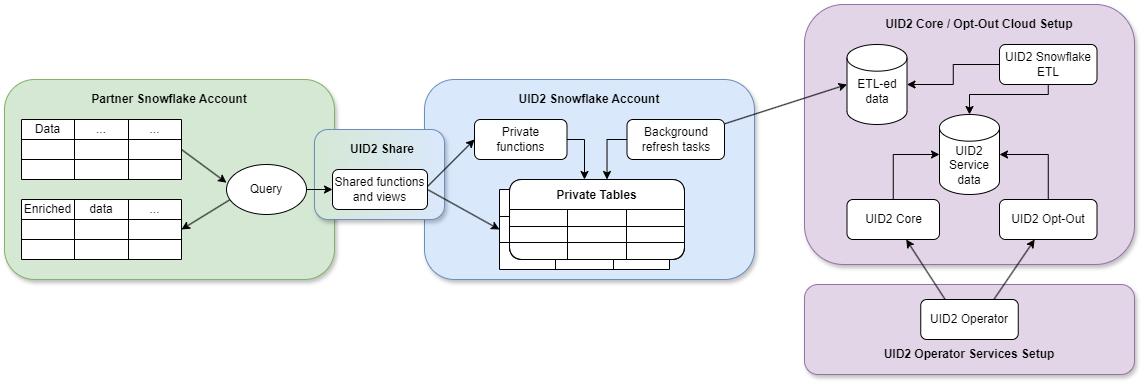
| Partner Snowflake account | UID2 Snowflake account | UID2 core opt-out cloud setup |
|---|---|---|
| As a partner, you set up a Snowflake account to host your data and engage in UID2 integration by consuming functions and views through the UID2 Share. | UID2 integration, hosted in a Snowflake account, grants you access to authorized functions and views that draw data from private tables. You can't access the private tables. The UID2 Share reveals only essential data needed for you to perform UID2-related tasks. NOTE: We store salts and encryption keys in the private tables. No DII is stored at any point. | ETL (Extract Transform Load) jobs constantly update the UID2 Core/Optout Snowflake storage with internal data that powers the UID2 Operator Web Services. The data used by the Operator Web Services is also available through the UID2 Share. |
| When you use shared functions and views, you pay Snowflake for transactional computation costs. | These private tables, secured in the UID2 Snowflake account, automatically synchronize with the UID2 Core/Optout Snowflake storage that holds internal data used to complete UID2-related tasks. |
Preparing DII for processing
It's critical that the input data, which you are converting to UID2, is in an acceptable format. If it isn't, you won't get the expected results. For example, you must normalize phone numbers to include the country code, as explained in Phone number normalization.
For details, see Preparing emails and phone numbers for processing.
To validate the full token generation pipeline end to end, confirming that tokens generated from your normalized, hashed, and encoded values are correct, use the UID2 Token Validator.
Summary of integration steps
To be able to request data, you must use the ACCOUNTADMIN role or another role with the CREATE DATABASE and IMPORT SHARE privileges in your Snowflake account.
The following list summarizes the integration steps for UID2 mapping in Snowflake in the production environment:
If you want to try out an integration before using the production environment, see Testing in the integ environment.
-
Make sure that the UID2 POC paperwork is signed with your UID2 contact. If you're not sure who to ask, see Contact info.
-
Request access to the UID2 share:
-
Request access through the Snowflake marketplace listing. In your request, include your Snowflake account number and the region.
-
Let your UID2 contact know that you've requested access.
-
-
Your UID2 contact arranges for your Snowflake account to be provisioned with access to the UID2 mapping share.
If you did any initial testing (see Testing in the integ environment), be sure to update the functions to reflect the production UID2 share, along with your own relevant table names.
Testing in the integ environment
If you'd like to test the mapping share before signing a UID2 POC, you can ask your UID2 contact for access to the Snowflake share in the integ (integration) environment. This environment is for testing only, and has no production data. In the request, be sure to include your account number and region.
In this scenario, the following steps occur:
-
Your UID2 contact provisions the share listing in the Snowflake Private Marketplace, and lets you know when this step is complete.
-
You can then view the Private Marketplace listing and request access to the integ share.
-
When you've requested access, your UID2 contact provisions the integ share to your account.
Shared objects
You can map DII to UID2s by using the following function:
FN_T_IDENTITY_MAP_V3(for details, see Map DII)
The following function is deprecated in favor of FN_T_IDENTITY_MAP_V3. You can still use it if you are on the previous Snowflake version (see Snowflake integration guide (pre-July 2025)), but we recommend upgrading as soon as possible:
FN_T_IDENTITY_MAP(deprecated)
If you are using the deprecated function, and need help migrating to the newer function, see Migration guide.
To identify the UID2s that you must regenerate, monitor the REFRESH_FROM timestamps returned by the FN_T_IDENTITY_MAP_V3 function. For details, see Monitor raw UID2 refresh and regenerate raw UID2s.
The following functions are also available, for UID2 sharing participants:
FN_T_ENCRYPT(See Encrypt tokens)FN_T_DECRYPT(See Decrypt tokens)
For details, see Usage for UID2 sharers.
Database and schema names
The following sections include query examples for each solution, which are identical except for the database and schema name variables:
{DATABASE_NAME}.{SCHEMA_NAME}
For example:
select UID, PREV_UID, REFRESH_FROM, UNMAPPED from table({DATABASE_NAME}.{SCHEMA_NAME}.FN_T_IDENTITY_MAP_V3('validate@example.com', 'email'));
All query examples use the following default values for each name variable:
| Variable | Default value | Comments |
|---|---|---|
{DATABASE_NAME} | UID2_PROD_UID_SH | If needed, you can change the default database name when creating a new database after you are granted access to the selected UID2 Share. |
{SCHEMA_NAME} | UID | This is an immutable name. |
Map DII
To map all types of DII, use the FN_T_IDENTITY_MAP_V3 function.
If the DII is an email address, the service normalizes the data using the UID2 Email address normalization rules.
If the DII is a phone number, you must normalize it before sending it to the service, using the UID2 Phone number normalization rules.
| Argument | Data type | Description |
|---|---|---|
INPUT | varchar(256) | The DII to map to the UID2, refresh timestamp and previous UID2 for 90 days after rotation. |
INPUT_TYPE | varchar(256) | The type of DII to map. Allowed values: email, email_hash, phone, and phone_hash. |
A successful query returns the following information for the specified DII.
| Column name | Data type | Description |
|---|---|---|
UID | TEXT | The value is one of the following:
|
PREV_UID | TEXT | The value is one of the following:
|
REFRESH_FROM | NUMBER | The value is one of the following:
|
UNMAPPED | TEXT | The value is one of the following:
|
Values for the UNMAPPED column
The following table shows possible values for the UNMAPPED column.
| Value | Meaning |
|---|---|
NULL | The DII was successfully mapped. |
OPTOUT | The user has opted out. |
INVALID IDENTIFIER | The email address or phone number is invalid. |
INVALID INPUT TYPE | The value of INPUT_TYPE is invalid. Valid values for INPUT_TYPE are: email, email_hash, phone, phone_hash. |
Examples
Mapping request examples in this section:
- Single unhashed email
- Multiple unhashed emails
- Single unhashed phone number
- Multiple unhashed phone numbers
- Single hashed email
- Multiple hashed emails
- Single hashed phone number
- Multiple hashed phone numbers
The input and output data in these examples is fictitious, for illustrative purposes only. The values provided are not real values.
Mapping request example - single unhashed email
The following query illustrates how to map a single email address, using the default database and schema names.
select UID, PREV_UID, REFRESH_FROM, UNMAPPED from table(UID2_PROD_UID_SH.UID.FN_T_IDENTITY_MAP_V3('validate@example.com', 'email'));
Query results for a single email:
+----------------------------------------------+--------------------------------------------------+--------------+----------+
| UID                                          | PREV_UID                                         | REFRESH_FROM | UNMAPPED |
+----------------------------------------------+--------------------------------------------------+--------------+----------+
| 2ODl112/VS3x2vL+kG1439nPb7XNngLvOWiZGaMhdcU= | vP9zK2mL7fR4tY8qN3wE6xB0dH5jA1sC+nI/oGuMeVa=     | 1735689600   | NULL     |
+----------------------------------------------+--------------------------------------------------+--------------+----------+
Mapping request example - multiple unhashed emails
The following query illustrates how to map multiple email addresses, using the default database and schema names.
select a.ID, a.EMAIL, m.UID, m.PREV_UID, m.REFRESH_FROM, m.UNMAPPED from AUDIENCE a LEFT JOIN(
    select ID, t.* from AUDIENCE, lateral UID2_PROD_UID_SH.UID.FN_T_IDENTITY_MAP_V3(EMAIL, 'email') t) m
    on a.ID=m.ID;
Query results for multiple emails:
The following table identifies each item in the response, including NULL values for NULL or improperly formatted emails.
+----+----------------------+----------------------------------------------+----------------------------------------------+--------------+--------------------+
| ID | EMAIL                | UID                                          | PREV_UID                                     | REFRESH_FROM | UNMAPPED           |
+----+----------------------+----------------------------------------------+----------------------------------------------+--------------+--------------------+
|  1 | validate@example.com | 2ODl112/VS3x2vL+kG1439nPb7XNngLvOWiZGaMhdcU= | vP9zK2mL7fR4tY8qN3wE6xB0dH5jA1sC+nI/oGuMeVa= | 1735689600   | NULL               |
|  2 | test@uidapi.com      | IbW4n6LIvtDj/8fCESlU0QG9K/fH63UdcTkJpAG8fIQ= | NULL                                         | 1735689600   | NULL               |
|  3 | optout@example.com   | NULL                                         | NULL                                         | NULL         | OPTOUT             |
|  4 | invalid-email        | NULL                                         | NULL                                         | NULL         | INVALID IDENTIFIER |
|  5 | NULL                 | NULL                                         | NULL                                         | NULL         | INVALID IDENTIFIER |
+----+----------------------+----------------------------------------------+----------------------------------------------+--------------+--------------------+
Mapping request example - single unhashed phone number
The following query illustrates how to map a phone number, using the default database and schema names.
You must normalize phone numbers using the UID2 Phone number normalization rules.
select UID, PREV_UID, REFRESH_FROM, UNMAPPED from table(UID2_PROD_UID_SH.UID.FN_T_IDENTITY_MAP_V3('+12345678901', 'phone'));
Query results for a single phone number:
+----------------------------------------------+----------+--------------+----------+
| UID                                          | PREV_UID | REFRESH_FROM | UNMAPPED |
+----------------------------------------------+----------+--------------+----------+
| 2ODl112/VS3x2vL+kG1439nPb7XNngLvOWiZGaMhdcU= | NULL     | 1735689600   | NULL     |
+----------------------------------------------+----------+--------------+----------+
Mapping request example - multiple unhashed phone numbers
The following query illustrates how to map multiple phone numbers, using the default database and schema names.
You must normalize phone numbers using the UID2 Phone number normalization rules.
select a.ID, a.PHONE, m.UID, m.PREV_UID, m.REFRESH_FROM, m.UNMAPPED from AUDIENCE a LEFT JOIN(
    select ID, t.* from AUDIENCE, lateral UID2_PROD_UID_SH.UID.FN_T_IDENTITY_MAP_V3(PHONE, 'phone') t) m
    on a.ID=m.ID;
Query results for multiple phone numbers:
The following table identifies each item in the response, including NULL values for NULL or invalid phone numbers.
+----+--------------+----------------------------------------------+----------------------------------------------+--------------+--------------------+
| ID | PHONE        | UID                                          | PREV_UID                                     | REFRESH_FROM | UNMAPPED           |
+----+--------------+----------------------------------------------+----------------------------------------------+--------------+--------------------+
|  1 | +12345678901 | 2ODl112/VS3x2vL+kG1439nPb7XNngLvOWiZGaMhdcU= | vP9zK2mL7fR4tY8qN3wE6xB0dH5jA1sC+nI/oGuMeVa= | 1735689600   | NULL               |
|  2 | +61491570006 | IbW4n6LIvtDj/8fCESlU0QG9K/fH63UdcTkJpAG8fIQ= | NULL                                         | 1735689600   | NULL               |
|  3 | +56789123001 | NULL                                         | NULL                                         | NULL         | OPTOUT             |
|  4 | 1234         | NULL                                         | NULL                                         | NULL         | INVALID IDENTIFIER |
|  5 | NULL         | NULL                                         | NULL                                         | NULL         | INVALID IDENTIFIER |
+----+--------------+----------------------------------------------+----------------------------------------------+--------------+--------------------+
Mapping request example - single hashed email
The following query illustrates how to map a single email address hash, using the default database and schema names.
select UID, PREV_UID, REFRESH_FROM, UNMAPPED from table(UID2_PROD_UID_SH.UID.FN_T_IDENTITY_MAP_V3(BASE64_ENCODE(SHA2_BINARY('validate@example.com', 256)), 'email_hash'));
Query results for a single hashed email:
+----------------------------------------------+----------------------------------------------+--------------+----------+
| UID                                          | PREV_UID                                     | REFRESH_FROM | UNMAPPED |
+----------------------------------------------+----------------------------------------------+--------------+----------+
| 2ODl112/VS3x2vL+kG1439nPb7XNngLvOWiZGaMhdcU= | vP9zK2mL7fR4tY8qN3wE6xB0dH5jA1sC+nI/oGuMeVa= | 1735689600   | NULL     |
+----------------------------------------------+----------------------------------------------+--------------+----------+
Mapping request example - multiple hashed emails
The following query illustrates how to map multiple email address hashes, using the default database and schema names.
select a.ID, a.EMAIL_HASH, m.UID, m.PREV_UID, m.REFRESH_FROM, m.UNMAPPED from AUDIENCE a LEFT JOIN(
    select ID, t.* from AUDIENCE, lateral UID2_PROD_UID_SH.UID.FN_T_IDENTITY_MAP_V3(EMAIL_HASH, 'email_hash') t) m
    on a.ID=m.ID;
Query results for multiple hashed emails:
The following table identifies each item in the response, including NULL values for NULL hashes.
+----+----------------------------------------------+----------------------------------------------+----------------------------------------------+--------------+--------------------+
| ID | EMAIL_HASH                                   | UID                                          | PREV_UID                                     | REFRESH_FROM | UNMAPPED           |
+----+----------------------------------------------+----------------------------------------------+----------------------------------------------+--------------+--------------------+
|  1 | LdhtUlMQ58ZZy5YUqGPRQw5xUMS5dXG5ocJHYJHbAKI= | 2ODl112/VS3x2vL+kG1439nPb7XNngLvOWiZGaMhdcU= | vP9zK2mL7fR4tY8qN3wE6xB0dH5jA1sC+nI/oGuMeVa= | 1735689600   | NULL               |
|  2 | /XJSTajB68SCUyuc3ePyxSLNhxrMKvJcjndq8TuwW5g= | IbW4n6LIvtDj/8fCESlU0QG9K/fH63UdcTkJpAG8fIQ= | NULL                                         | 1735689600   | NULL               |
|  2 | UebesrNN0bQkm/QR7Jx7eav+UDXN5Gbq3zs1fLBMRy0= | NULL                                         | NULL                                         | 1735689600   | OPTOUT             |
|  4 | NULL                                         | NULL                                         | NULL                                         | NULL         | INVALID IDENTIFIER |
+----+----------------------------------------------+----------------------------------------------+----------------------------------------------+--------------+--------------------+
Mapping request example - single hashed phone number
The following query illustrates how to map a single phone number hash, using the default database and schema names.
select UID, PREV_UID, REFRESH_FROM, UNMAPPED from table(UID2_PROD_UID_SH.UID.FN_T_IDENTITY_MAP_V3(BASE64_ENCODE(SHA2_BINARY('+12345678901', 256)), 'phone_hash'));
Query results for a single hashed phone number:
+----------------------------------------------+----------------------------------------------+--------------+----------+
| UID                                          | PREV_UID                                     | REFRESH_FROM | UNMAPPED |
+----------------------------------------------+----------------------------------------------+--------------+----------+
| 2ODl112/VS3x2vL+kG1439nPb7XNngLvOWiZGaMhdcU= | vP9zK2mL7fR4tY8qN3wE6xB0dH5jA1sC+nI/oGuMeVa= | 1735689600   | NULL     |
+----------------------------------------------+----------------------------------------------+--------------+----------+
Mapping request example - multiple hashed phone numbers
The following query illustrates how to map multiple phone number hashes, using the default database and schema names.
select a.ID, a.PHONE_HASH, m.UID, m.PREV_UID, m.REFRESH_FROM, m.UNMAPPED from AUDIENCE a LEFT JOIN(
    select ID, t.* from AUDIENCE, lateral UID2_PROD_UID_SH.UID.FN_T_IDENTITY_MAP_V3(PHONE_HASH, 'phone_hash') t) m
    on a.ID=m.ID;
Query results for multiple hashed phone numbers:
The following table identifies each item in the response, including NULL values for NULL hashes.
+----+----------------------------------------------+----------------------------------------------+----------------------------------------------+--------------+--------------------+
| ID | PHONE_HASH                                   | UID                                          | PREV_UID                                     | REFRESH_FROM | UNMAPPED           |
+----+----------------------------------------------+----------------------------------------------+----------------------------------------------+--------------+--------------------+
|  1 | LdhtUlMQ58ZZy5YUqGPRQw5xUMS5dXG5ocJHYJHbAKI= | 2ODl112/VS3x2vL+kG1439nPb7XNngLvOWiZGaMhdcU= | vP9zK2mL7fR4tY8qN3wE6xB0dH5jA1sC+nI/oGuMeVa= | 1735689600   | NULL               |
|  2 | /XJSTajB68SCUyuc3ePyxSLNhxrMKvJcjndq8TuwW5g= | IbW4n6LIvtDj/8fCESlU0QG9K/fH63UdcTkJpAG8fIQ= | NULL                                         | 1735689600   | NULL               |
|  2 | UebesrNN0bQkm/QR7Jx7eav+UDXN5Gbq3zs1fLBMRy0= | NULL                                         | NULL                                         | 1735689600   | OPTOUT             |
|  4 | NULL                                         | NULL                                         | NULL                                         | NULL         | INVALID IDENTIFIER |
+----+----------------------------------------------+----------------------------------------------+----------------------------------------------+--------------+--------------------+
Monitor raw UID2 refresh and regenerate raw UID2s
The FN_T_IDENTITY_MAP_V3 function returns refresh timestamps (REFRESH_FROM) that indicate when each UID2 should be refreshed.
The raw UID2 does not change before the refresh timestamp. After the refresh timestamp, remapping the DII returns a new refresh timestamp, but the raw UID2 might or might not change. It is possible for the raw UID2 to remain unchanged for multiple refresh intervals.
To determine which UID2s need regeneration, compare the current time to the REFRESH_FROM timestamps returned by the function.
| Column name | Data type | Description |
|---|---|---|
UID | TEXT | The UID2 associated with the DII. This is the current UID2 value returned by the identity mapping function. |
REFRESH_FROM | NUMBER | The timestamp (in epoch seconds) indicating when this UID2 should be refreshed. Compare this value to the current time to determine if regeneration is needed. |
The following example shows an input table and the query used to find the UID2s in the table that must be regenerated because their refresh time has been reached.
Targeted input table
In this example scenario, the advertiser/data provider has stored the UID2s in a table named AUDIENCE_WITH_UID2. The REFRESH_FROM column contains the timestamp when each UID2 should be refreshed. If no UID2 has been generated, the value is NULL, as shown in the third example. The advertiser/data provider can compare these timestamps to the current time to determine which UID2s need to be regenerated.
select * from AUDIENCE_WITH_UID2;
+----+----------------------+----------------------------------------------+--------------+
| ID | EMAIL                | UID2                                         | REFRESH_FROM |
+----+----------------------+----------------------------------------------+--------------+
|  1 | validate@example.com | 2ODl112/VS3x2vL+kG1439nPb7XNngLvOWiZGaMhdcU= | 1735689600   |
|  2 | test1@uidapi.com     | Q4A5ZBuBCYfuV3Wd8Fdsx2+i33v7jyFcQbcMG/LH4eM= | 1735776000   |
|  3 | test2@uidapi.com     | NULL                                         | NULL         |
+----+----------------------+----------------------------------------------+--------------+
To find missing or outdated UID2s, use the following query example.
select * from AUDIENCE_WITH_UID2
  where REFRESH_FROM <= DATE_PART(epoch_second, CURRENT_TIMESTAMP()) or UID2 IS NULL;
Query results:
The following table identifies each item in the response. The result includes UID2s that need to be refreshed because their REFRESH_FROM timestamp has passed, or UID2s that are missing. ID 1 is returned because its refresh time (1735689600) is in the past (assuming current time is later). ID 2 is not returned because its refresh time hasn't been reached yet. ID 3 is returned due to a missing UID2.
+----+----------------------+----------------------------------------------+--------------+
| ID | EMAIL                | UID2                                         | REFRESH_FROM |
+----+----------------------+----------------------------------------------+--------------+
|  1 | validate@example.com | 2ODl112/VS3x2vL+kG1439nPb7XNngLvOWiZGaMhdcU= | 1735689600   |
|  3 | test2@uidapi.com     | NULL                                         | NULL         |
+----+----------------------+----------------------------------------------+--------------+
Usage for UID2 sharers
A UID2 sharing participant is a company that takes part in sharing, either as a sender or a receiver, to share UID2s with another participant.
Advertisers and data providers can share UID2s with other authorized UID2 sharing participants via Snowflake (tokenized sharing). They can encrypt raw UID2s into UID2 tokens and then send them to another participant for sharing in pixels (see Tokenized sharing in pixels). If you are not sending data in pixels within Snowflake, you can take part in UID2 sharing as long as you follow the requirements laid out in Security requirements for UID2 sharing.
The UID2 token generated during this process is for sharing only—you cannot use it in the bidstream. There is a different workflow for generating tokens for the bidstream: see Tokenized sharing in the bidstream.
If you are not sending data in pixels or in the bidstream within Snowflake, you can also take part in raw UID2 sharing as long as you follow the requirements laid out in Security requirements for UID2 sharing.
The following activities support tokenized sharing:
Encrypt tokens
To encrypt raw UID2s to UID2 tokens, use the FN_T_ENCRYPT function.
| Argument | Data type | Description |
|---|---|---|
RAW_UID2 | varchar(128) | The raw UID2 to encrypt to a UID2 token. |
A successful query returns the following information for the specified raw UID2.
| Column name | Data type | Description |
|---|---|---|
UID_TOKEN | TEXT | The value is one of the following:
|
ENCRYPTION_STATUS | TEXT | The value is one of the following:
|
Values for the ENCRYPTION_STATUS column
The following table shows possible values for the ENCRYPTION_STATUS column.
| Value | Meaning |
|---|---|
NULL | The raw UID2 was successfully encrypted. |
MISSING_OR_INVALID_RAW_UID2 | The raw UID2 is NULL. |
INVALID_RAW_UID2 | The raw UID2 is invalid. |
MISMATCHING_IDENTITY_SCOPE | The raw UID2 belongs to an incorrect identity scope; for example, EUID is passed in where UID2 is expected. |
NOT_AUTHORIZED_FOR_MASTER_KEY | The caller does not have access to the required encryption keys. Contact the UID2 administrator. |
NOT_AUTHORIZED_FOR_SITE_KEY | The caller does not have access to the required encryption keys. Contact the UID2 administrator. |
Encrypt token request example - single raw UID2
The following query illustrates how to encrypt a single raw UID2 to a UID2 token, using the default database and schema names.
select UID_TOKEN, ENCRYPTION_STATUS from table(UID2_PROD_UID_SH.UID.FN_T_ENCRYPT('2ODl112/VS3x2vL+kG1439nPb7XNngLvOWiZGaMhdcU='));
Query results for a single raw UID2:
+------------------------+-------------------+
| UID_TOKEN              | ENCRYPTION_STATUS |
+--------------------------------------------+
| A41234<rest of token>  | NULL              |
+--------------------------------------------+
Encrypt token request example - multiple raw UID2s
The following query illustrates how to encrypt multiple raw UID2s, using the default database and schema names.
select a.RAW_UID2, t.UID_TOKEN, t.ENCRYPTION_STATUS from AUDIENCE_WITH_UID2 a, lateral UID2_PROD_UID_SH.UID.FN_T_ENCRYPT(a.RAW_UID2) t;
Query results for multiple raw UID2s:
The following table identifies each item in the response, including NULL values for NULL raw UID2s.
+----+----------------------------------------------+-----------------------+-----------------------------+
| ID | RAW_UID2                                     | UID_TOKEN             | ENCRYPTION_STATUS           |
+----+----------------------------------------------+-----------------------+-----------------------------+
|  1 | 2ODl112/VS3x2vL+kG1439nPb7XNngLvOWiZGaMhdcU= | A41234<rest of token> | NULL                        |
|  2 | NULL                                         | NULL                  | MISSING_OR_INVALID_RAW_UID2 |
|  3 | BXJSTajB68SCUyuc3ePyxSLNhxrMKvJcjndq8TuwW5g5 | B45678<rest of token> | NULL                        |
+----+----------------------------------------------+-----------------------+-----------------------------+
Decrypt tokens
To decrypt UID2 tokens to raw UID2s, use the FN_T_DECRYPT function.
| Argument | Data type | Description |
|---|---|---|
UID_TOKEN | varchar(512) | The UID2 token to decrypt to a raw UID2. |
A successful query returns the following information for the specified UID2 token.
| Column name | Data type | Description |
|---|---|---|
UID | TEXT | The value is one of the following:
|
SITE_ID | INT | The value is one of the following:
|
DECRYPTION_STATUS | TEXT | The value is one of the following:
|
In most circumstances where UID2 token cannot be successfully decrypted, the function will not return any rows at all.
Values for the DECRYPTION_STATUS column
Possible values for DECRYPTION_STATUS are:
| Value | Meaning |
|---|---|
NULL | The UID2 token was successfully decrypted. |
EXPIRED_TOKEN | The UID2 token is beyond its designated lifetime—the token has expired. |
Decrypt token request example—single UID2 token
The following query illustrates how to decrypt a single UID2 token to a raw UID2, using the default database and schema names.
select UID, SITE_ID, DECRYPTION_STATUS from table(UID2_PROD_UID_SH.UID.FN_T_DECRYPT('A41234<rest of token>'));
Query results for a single UID2 token:
+----------------------------------------------+-------------------+
| UID                                          | DECRYPTION_STATUS |
+----------------------------------------------+-------------------+
| 2ODl112/VS3x2vL+kG1439nPb7XNngLvOWiZGaMhdcU= | NULL              |
+----------------------------------------------+-------------------+
Decrypt token request example—multiple UID2 tokens
The following query illustrates how to decrypt multiple UID2 tokens, using the default database and schema names.
select a.ID, b.UID, b.SITE_ID, CASE WHEN b.UID IS NULL THEN 'DECRYPT_FAILED' ELSE b.DECRYPTION_STATUS END as DECRYPTION_STATUS
  from TEST_IMPRESSION_DATA a LEFT OUTER JOIN (
    select ID, t.* from TEST_IMPRESSION_DATA, lateral UID2_PROD_UID_SH.UID.FN_T_DECRYPT(UID_TOKEN) t) b
  on a.ID=b.ID;
Query results for multiple UID2 tokens:
The following table identifies each item in the response, including NULL values for NULL and expired UID2 tokens.
+----+----------------------------------------------+----------+-------------------+
| ID | UID                                          | SITE_ID  | DECRYPTION_STATUS |
+----+----------------------------------------------+----------+-------------------+
|  1 | 2ODl112/VS3x2vL+kG1439nPb7XNngLvOWiZGaMhdcU= | 12345    | NULL              |
|  2 | NULL                                         | NULL     | DECRYPT_FAILED    |
|  3 | BXJSTajB68SCUyuc3ePyxSLNhxrMKvJcjndq8TuwW5g5 | 23456    | NULL              |
|  4 | NULL                                         | NULL     | EXPIRED_TOKEN     |
|  5 | 2ODl112/VS3x2vL+kG1439nPb7XNngLvOWiZGaMhdcU= | 12345    | NULL              |
+----+----------------------------------------------+----------+-------------------+
UID2 sharing example
The following instructions provide an example of how sharing works for a sender and a receiver both using Snowflake. In this example scenario an advertiser (the sender) has an audience table with raw UID2s
(AUDIENCE_WITH_UID2S) and wants to make data in the table available to a data provider (the receiver) using the Snowflake Secure Data Sharing feature.
Sender instructions
- Create a new table named
AUDIENCE_WITH_UID2_TOKENS. - Encrypt the raw UID2s in the
AUDIENCE_WITH_UID2Stable and store the result in theAUDIENCE_WITH_UID2_TOKENStable. For example, the following query could help achieve this task:insert into AUDIENCE_WITH_UID2_TOKENS select a.ID, t.UID_TOKEN from AUDIENCE_WITH_UID2S a, lateral UID2_PROD_UID_SH.UID.FN_T_ENCRYPT(a.RAW_UID2) t; - Create a secure share and grant it access to the
AUDIENCE_WITH_UID2_TOKENStable. - Grant the receiver access to the secure share.
To help prevent UID2 tokens from expiring during sharing, send the newly encrypted UID2 tokens to the receiver as soon as possible.
Receiver instructions
- Create a database from the secure share that the sender provided access to.
- Create a new table named
RECEIVED_AUDIENCE_WITH_UID2. - Decrypt tokens from the shared
AUDIENCE_WITH_UID2_TOKENStable and store the result in theRECEIVED_AUDIENCE_WITH_UID2table. For example, the following query could be used to achieve this:insert into RECEIVED_AUDIENCE_WITH_UID2
select a.ID, b.UID, CASE WHEN b.UID IS NULL THEN 'DECRYPT_FAILED' ELSE b.DECRYPTION_STATUS END as DECRYPTION_STATUS
from AUDIENCE_WITH_UID2_TOKENS a LEFT OUTER JOIN (
select ID, t.* from AUDIENCE_WITH_UID2_TOKENS, lateral UID2_PROD_UID_SH.UID.FN_T_DECRYPT(UID_TOKEN) t) b
on a.ID=b.ID;
To help prevent UID2 tokens from expiring, decrypt the UID2 tokens as soon as they become available from the sender.
Migration guide
This section provides information to help you upgrade from the previous version to the new UID2 Snowflake functionality with v3 functions.
If you're upgrading from a version earlier than February 2025, see Migration guide in the documentation for the previous version.
Changing existing code
For a summary of changes, see Changes from previous version. The code snippets in this section are before/after examples of how the earlier functions might be implemented, and how you could update to use the new function. The key change is migrating from FN_T_IDENTITY_MAP to FN_T_IDENTITY_MAP_V3, which provides refresh timestamps instead of salt bucket IDs and includes previous UID2 access.
Example for mapping unhashed emails
Before:
select UID, BUCKET_ID, UNMAPPED from table({DATABASE_NAME}.{SCHEMA_NAME}.FN_T_IDENTITY_MAP(EMAIL, 'email'));
After:
select UID, PREV_UID, REFRESH_FROM, UNMAPPED from table({DATABASE_NAME}.{SCHEMA_NAME}.FN_T_IDENTITY_MAP_V3(EMAIL, 'email'));
Example for mapping unhashed phone numbers
Before:
select UID, BUCKET_ID, UNMAPPED from table({DATABASE_NAME}.{SCHEMA_NAME}.FN_T_IDENTITY_MAP(PHONE_NUMBER, 'phone'));
After:
select UID, PREV_UID, REFRESH_FROM, UNMAPPED from table({DATABASE_NAME}.{SCHEMA_NAME}.FN_T_IDENTITY_MAP_V3(PHONE_NUMBER, 'phone'));
Example for monitoring UID2 refresh and regenerating raw UID2s
The v3 function provides refresh timestamps directly, eliminating the need to monitor salt buckets. Instead of joining with salt bucket views, you can compare the current timestamp against the REFRESH_FROM timestamp returned by the function.
Before (using salt bucket monitoring):
select a.*, b.LAST_SALT_UPDATE_UTC
  from AUDIENCE_WITH_UID2 a LEFT OUTER JOIN {DATABASE_NAME}.{SCHEMA_NAME}.SALT_BUCKETS b
  on a.BUCKET_ID=b.BUCKET_ID
  where a.LAST_UID2_UPDATE_UTC < b.LAST_SALT_UPDATE_UTC or a.UID2 IS NULL;
After (using refresh timestamp monitoring):
select * from AUDIENCE_WITH_UID2
  where REFRESH_FROM <= DATE_PART(epoch_second, CURRENT_TIMESTAMP()) or UID2 IS NULL;